AI image tools are no longer just novelty apps for fantasy art. In 2026, they can help create blog headers, product mockups, social media posts, ad creatives, logos, icons, presentation visuals, brand illustrations, and polished image edits in minutes.
The best AI tool for images depends on the final output. A realistic product concept, a social post, a logo idea, a text-heavy poster, and a finished ecommerce ad all need different strengths.
This guide expands the original Krino Reviews AI image generator comparison into a broader review of AI tools for images: generators, editors, brand-asset tools, social design tools, and advanced model workflows.
Quick comparison table
| Tool | Best for | Main strength | Main drawback |
|---|---|---|---|
| ChatGPT Image | Best overall for beginners | Easy prompting and practical editing | Less advanced creative control than specialist tools |
| Midjourney | Artistic and editorial images | Beautiful style, lighting, composition | Learning curve and weaker text rendering |
| Google Gemini / Nano Banana | Fast general-purpose generation | Strong everyday results | Features may vary by plan or region |
| Ideogram | Text in images | Posters, logos, signs, typography | Some outputs still need refinement |
| Recraft | Brand graphics and vector-style design | Icons, brand consistency, graphic assets | More complex than basic generators |
| Adobe Firefly | Adobe workflows | Editing, generative fill, commercial-friendly workflows | Not always the strongest pure generator |
| FLUX | Advanced control | Flexible high-quality model ecosystem | Can be technical depending on interface |
| Canva AI | Social media and simple marketing graphics | Templates and easy publishing | Less powerful for advanced generation |
| Freepik AI | Stock-style visuals | Good for marketing assets | Credit systems can be confusing |
| Krea AI | Real-time creative exploration | Fast iteration and visual testing | Results vary on complex prompts |
How to choose the best AI image tool
Start with the job the image has to do. Do you need a realistic product image, a finished social post, a logo concept, a blog header, a YouTube thumbnail, a brand illustration, or an ad creative?
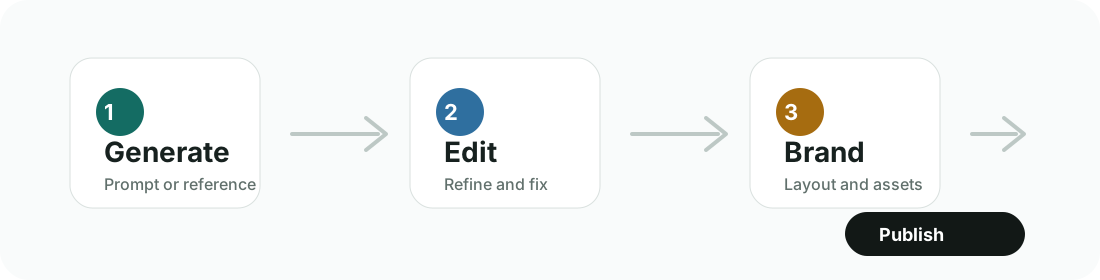
A practical workflow is often better than a single-tool mindset:
- Generate the first image in ChatGPT Image, Gemini, Midjourney, or FLUX.
- Edit or refine the image in the same tool, ChatGPT, Gemini, or Adobe Firefly.
- Add layout, text, and brand assets in Canva, Recraft, Photoshop, or a similar design tool.
- Export for web, ads, ecommerce, email, presentations, or social media.
Best AI tools for images by use case
| Use case | Best starting points | Why |
|---|---|---|
| Best for realistic photos | ChatGPT Image, Gemini, FLUX | Good for realistic concepts, general-purpose image generation, and edits. |
| Best for social media images | Canva AI, ChatGPT Image, Freepik AI | Canva handles final layouts; ChatGPT and Freepik can help with source visuals. |
| Best for logos | Ideogram, Recraft | Ideogram helps with text concepts; Recraft is stronger for brand graphics and vector-style assets. |
| Best for product images | Adobe Firefly, ChatGPT Image, Gemini | Useful for backgrounds, ad concepts, and edits; ecommerce images still need accuracy checks. |
| Best for text in images | Ideogram, Gemini, Recraft | Better starting points when typography and readable words matter. |
| Best for brand consistency | Recraft, Canva AI, Adobe Firefly | Better fit for repeatable brand assets and controlled visual systems. |
| Best free AI image tool | ChatGPT, Gemini, Ideogram, Canva, Freepik, Krea | Free plans change often, so verify current limits before choosing. |
| Best for ecommerce | Adobe Firefly, Canva AI, ChatGPT Image | Useful for campaign visuals, lifestyle backgrounds, and product-ad layouts. |
| Best for bloggers | ChatGPT Image, Canva AI, Freepik AI | Good for headers, supporting visuals, and simple publishing workflows. |
| Best for agencies | Midjourney, Recraft, Adobe Firefly, FLUX | Better for art direction, brand systems, controlled production, and advanced workflows. |
| Best for YouTube thumbnails | Canva AI, Ideogram, ChatGPT Image | Combines generated visuals, text concepts, and final layout work. |
| Best for ads | Canva AI, Adobe Firefly, Freepik AI, Recraft | Useful for layouts, variations, brand control, and campaign asset production. |
Detailed reviews of the best AI tools for images
ChatGPT Image
Best for: beginners and general-purpose image work.
ChatGPT Image is a strong first stop because it works through natural prompting. You can brainstorm a concept, rewrite the prompt, ask for changes, and keep the image work inside a broader assistant workflow.
Ideal users: bloggers, founders, small teams, educators, and creators who want one flexible AI workspace.
Limitations: specialist tools may offer more style control, asset systems, or production workflows.
Recommended use cases: blog headers, concept images, visual brainstorming, basic edits, and general marketing visuals. Official source: OpenAI ChatGPT Images.
Midjourney
Best for: artistic and cinematic images.
Midjourney is strongest when visual style, lighting, mood, and composition matter. It is a good fit for editorial imagery, art direction, mood boards, campaign concepts, and distinctive creative visuals.
Ideal users: artists, agencies, designers, creative directors, and content teams with a visual-first workflow.
Limitations: it has a learning curve, and text rendering is not its main strength.
Recommended use cases: editorial images, concept art, cinematic visuals, and campaign direction. Official source: Midjourney plans.
Google Gemini / Nano Banana
Best for: fast general-purpose image generation and editing.
Gemini image features, including Nano Banana image editing, are useful for everyday image tasks, fast variations, and general creative drafts. It is especially useful if you already work inside Google's AI ecosystem.
Ideal users: general users, marketers, creators, students, and teams already using Gemini.
Limitations: features can vary by plan, region, device, and app surface.
Recommended use cases: quick image concepts, visual variations, photo edits, and general-purpose drafts. Official sources: Gemini image generation and Google Nano Banana announcement.
Ideogram
Best for: text inside images.
Ideogram is useful when the image needs readable words, poster layouts, signs, social headlines, or typography-led concepts. It is one of the better starting points for visual ideas where text is part of the composition.
Ideal users: marketers, poster designers, content creators, and small businesses making campaign concepts.
Limitations: output can still need refinement before final publication.
Recommended use cases: posters, signs, social graphics, logo concepts, and text-forward ads. Official source: Ideogram pricing.
Recraft
Best for: brand graphics and vector-style assets.
Recraft is more design-system oriented than a basic generator. It is useful for icons, brand graphics, consistent visual assets, and controlled creative systems.
Ideal users: designers, product marketers, brand teams, agencies, and creators building repeatable assets.
Limitations: it can feel more complex than a simple prompt-based image generator.
Recommended use cases: icon sets, brand illustrations, vector-style graphics, campaign assets, and visual systems. Official source: Recraft pricing.
Adobe Firefly
Best for: Adobe workflows and commercial-friendly creative production.
Adobe Firefly is useful when generation, editing, and design need to connect with Creative Cloud workflows. It is especially relevant for refining, extending, or modifying images in a production design environment.
Ideal users: designers, marketers, Adobe users, creative teams, and businesses that care about workflow governance.
Limitations: it may not always be the most expressive pure image generator compared with style-first tools.
Recommended use cases: generative fill, image editing, campaign assets, Creative Cloud production, and commercial-friendly workflows. Official sources: Adobe Firefly and Adobe generative credits.
FLUX
Best for: advanced control and customization.
FLUX models from Black Forest Labs are useful for advanced creators who want model-level flexibility through local, hosted, or third-party interfaces. The experience depends heavily on where and how you access the model.
Ideal users: AI power users, developers, technical creators, and teams building custom workflows.
Limitations: setup and interface choices can be more technical than mainstream tools.
Recommended use cases: advanced generation, controlled workflows, experimentation, and custom image pipelines. Official source: Black Forest Labs FLUX repository.
Canva AI
Best for: social media and simple marketing graphics.
Canva AI is strong when the final deliverable is a designed asset, not just a generated image. It combines AI features with templates, layouts, brand assets, export sizes, and publishing-oriented design tools.
Ideal users: marketers, small businesses, creators, educators, and non-designers.
Limitations: it is less powerful than specialist image generators for advanced art direction.
Recommended use cases: social posts, ads, thumbnails, flyers, presentations, and simple campaign graphics. Official source: Canva AI image generator.
Freepik AI
Best for: stock-style visuals and marketing assets.
Freepik AI is useful when you want AI generation inside a broader creative-asset environment. It can fit teams that already use stock libraries and want campaign visuals or asset variations.
Ideal users: marketers, agencies, bloggers, ecommerce teams, and content teams.
Limitations: credit systems and plan rules should be reviewed before building a repeat workflow around it.
Recommended use cases: stock-style images, backgrounds, campaign visuals, blog graphics, and marketing assets. Official source: Freepik AI Image Generator.
Krea AI
Best for: real-time creative exploration.
Krea is useful when you want to explore images quickly, test visual directions, and iterate on creative ideas. It works well as an early-stage exploration tool.
Ideal users: designers, art directors, creators, and visual teams exploring multiple directions.
Limitations: complex prompts may require iteration, and another tool may be needed for final layout or publishing.
Recommended use cases: visual exploration, style discovery, concept testing, and rapid creative iteration. Official sources: Krea and Krea image generation docs.
AI image generator vs AI image editor
An AI image generator creates a new image from a prompt, reference, or starting concept. It is best for blank-page creation, concept art, blog headers, ad ideas, social visuals, and creative exploration.
An AI image editor changes an existing image. It can replace a background, remove an object, extend a frame, adjust a product scene, add variations, or refine details. For business workflows, editing is often just as important as generation.
Commercial-use checklist
Before using AI images for client work, ads, ecommerce, or paid campaigns, check:
- Whether the tool allows commercial use on your plan.
- Whether generated images are public by default.
- Whether uploaded images may be used for training.
- Whether there are watermarks.
- Whether there are restrictions around real people, celebrities, logos, copyrighted characters, or brand names.
- Whether the output needs human review before client or advertising use.
- Whether ecommerce images accurately represent the real product.
Prompting tips with examples
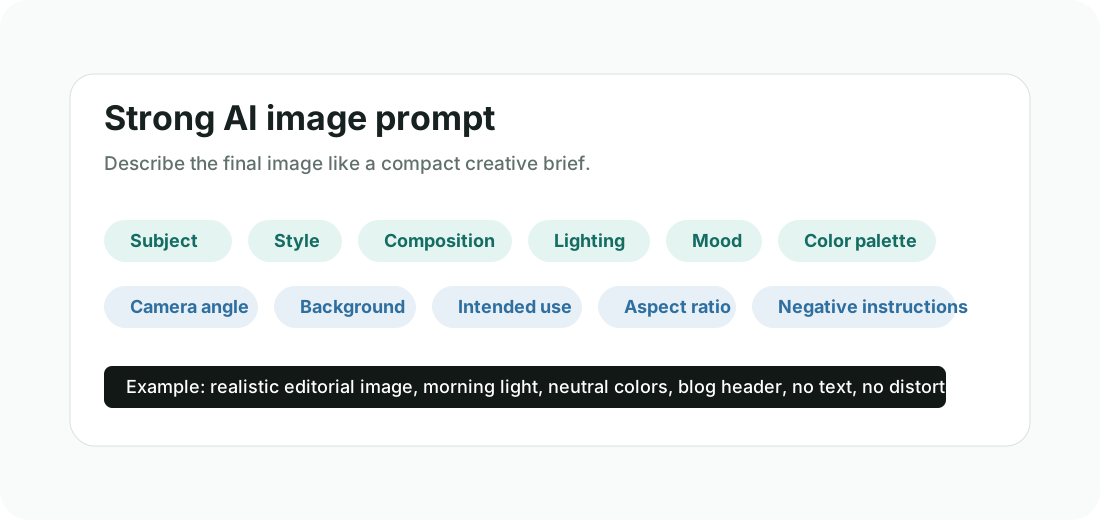
Strong prompts describe the image like a compact creative brief. Include the subject, style, composition, lighting, mood, color palette, camera angle, background, intended use, aspect ratio, and negative instructions.
Weak prompt: Create an image of a woman working.
Improved prompt: Create a realistic editorial-style image of a young professional woman working on a laptop in a bright modern home office, natural morning light, clean desk, soft neutral colors, shallow depth of field, suitable for a blog header about productivity, no text, no extra fingers, no distorted face.
Final recommendations
- Choose ChatGPT Image for the easiest all-purpose image workflow.
- Choose Midjourney for artistic and editorial visuals.
- Choose Gemini for fast general-purpose generation and editing.
- Choose Ideogram when text inside the image matters.
- Choose Recraft for brand graphics, icons, and vector-style assets.
- Choose Adobe Firefly for editing and Adobe workflows.
- Choose Canva AI for finished social media and marketing designs.
- Choose FLUX for advanced control and custom workflows.
Most serious users will combine two or three AI tools for images instead of relying on only one. A common workflow is to generate in one tool, refine in another, then finish the layout in Canva, Adobe, Recraft, or a similar editor.
FAQ
What are the best AI tools for images?
The best AI tools for images include ChatGPT Image, Midjourney, Gemini, Ideogram, Recraft, Adobe Firefly, FLUX, Canva AI, Freepik AI, and Krea AI.
Which AI image tool is best for beginners?
ChatGPT Image is a strong beginner-friendly option. Canva AI is also easy for non-designers creating finished social and marketing layouts.
Which AI tool creates the best art?
Midjourney is a strong choice for artistic, cinematic, and editorial images.
Which AI image tool is best for text?
Ideogram is a strong starting point for images with readable text, posters, signs, and typography-led concepts.
Which AI tool is best for brand graphics?
Recraft is a good fit for brand graphics, icons, vector-style assets, and visual systems.
Can I use AI-generated images commercially?
It depends on the tool, plan, license, input material, and use case. Always check the official terms before using AI-generated images commercially.
What is the best free AI image generator?
Free-plan limits change often. Check current options from ChatGPT, Gemini, Ideogram, Adobe Firefly, Canva, Freepik, and Krea before choosing.
Are AI image tools good for product photos?
They can help with product concepts, backgrounds, lifestyle images, and ad creatives. For ecommerce listings, final images should accurately represent the real product.
What is better: Midjourney or ChatGPT Image?
Midjourney is better when artistic style matters most. ChatGPT Image is better for general-purpose image work inside a broader AI assistant workflow.
What is better: Ideogram or Recraft?
Ideogram is better when text inside the image is central. Recraft is better for brand graphics, icons, and vector-style assets.
What is the difference between an AI image generator and an AI image editor?
An AI image generator creates new images from prompts or references. An AI image editor changes existing images by refining details, replacing objects, extending backgrounds, or adjusting composition.
Which AI image tool is best for social media posts?
Canva AI is a strong option for social media posts because it combines AI image features with templates, layout tools, brand assets, and export sizes.